Car List

Vehicle Condition Report
PPSR Search

OR

How to configure Dymo Printer?

eFleetPass requires Dymo printer DYMO LabelWriter 450 Duo to print different kinds of QR Codes to stick onto vehicles, trackers or tags. The setup files can be download from the links below: Dymo Connect: https://www.dymo.com/support?cfid=user-guide Dymo DLS (Web Services): https://www.dymo.com/en_CA/dymo-label-software-v854-windows.html


Filter

Change Password

Profile

Are you Sure?

Do you want to delete your profile photo?

Profile

Personal Info

  • Location:
    Suite 124, George Street, Australia
  • Phone:
    697 878 2312
  • DOB:
    20/09/2020

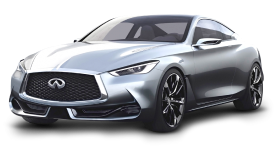
Silver INFINITI Q60 coupe

Car List

  • Rego:
    DXA52Z
  • Make Model:
    Silver INFINITI Q60 coupe
  • Registered State:
    NSW
  • Year:
    2018
  • Expirty Date:
    20/09/2020

Telemetry Info

  • Status:
    N/A
  • Fuel:
    80%
  • Total Km:
    100,577.00km
  • Condition:
    Ok
Print QR

To print the QR code you would need the following device: DYMO LabelWriter 450 Duo.

Condition Report for CXQ62E

Add Vehicle Condition Report for
#CXQ62E. VIN: WBA3B16000NS58958
  • Scratch
  • Dent
  • Cracked
  • Chipped
  • Missing
  • Scuff
  • Bend
  • C. Color
MFA Motorways
Clear
Clear
Upload Pictures Of #CXQ62E
  • MFA Motorways

    uploding_photo.jpeg

    25%

  • MFA Motorways

    Attach Back

  • MFA Motorways

    Attach left

    left_photo.jpeg

  • MFA Motorways

    Attach Right

  • MFA Motorways

    Attach Top

  • MFA Motorways

    Attach Dashboard

Clear
Skip & View Report Go to Checklist
Checklist for #CXQ62E
View Report
View Report

Forgot Password

Forgot Password?

You can reset your password here.

MFA Motorways

Password Changed!

Your password has been changed successfully.

Back To My App

Login

Welcome Back!

Enter your credential detail.

Forgot your Password?

Welcome Back!

Enter your PIN to Login.

Get Started